How Automated Scanning Prevents Audit Surprises
Automated scanning catches a minority of WCAG issues, but it catches them early and everywhere. How to use it well, and where human review is still required.

The Problem with Point-in-Time Audits
An accessibility audit is a snapshot. A consultant or internal team reviews your site on a given day, documents what they find, and produces a report. That report is accurate when it is written. A week later, after a content update, a new component deployment, or a third-party script change, some of those findings may be resolved while new ones have appeared.
This is not a criticism of auditors. It is a structural limitation of any review that happens at a fixed point in time. Web properties are not static. They change constantly, and accessibility conformance can regress just as quickly as it is gained.
Organizations that rely exclusively on periodic audits are always governing yesterday’s site.
What Continuous Scanning Actually Does
Automated accessibility scanning works differently. Instead of a single review, it runs checks against your live pages on a regular schedule, flagging issues as they emerge rather than weeks or months after the fact.
GuardGrid runs this scanning continuously across your web properties, mapping detected issues against WCAG criteria so your team always has a current picture of conformance status. When a developer ships a new accordion component that lacks proper keyboard focus management, the platform surfaces that finding before it reaches a formal audit, a user complaint, or a legal inquiry.
The practical effect is a shorter gap between introduction of an issue and awareness of it. That shorter gap means less remediation work, lower risk, and more predictable conformance over time.

What Automated Tools Can and Cannot Catch
It is worth being precise here. Automated scanning does not replace human judgment entirely. Some WCAG criteria require a person to evaluate context, for example whether alternative text is genuinely descriptive or merely present, whether a reading order makes sense to a screen reader user, or whether a complex data table is adequately explained.
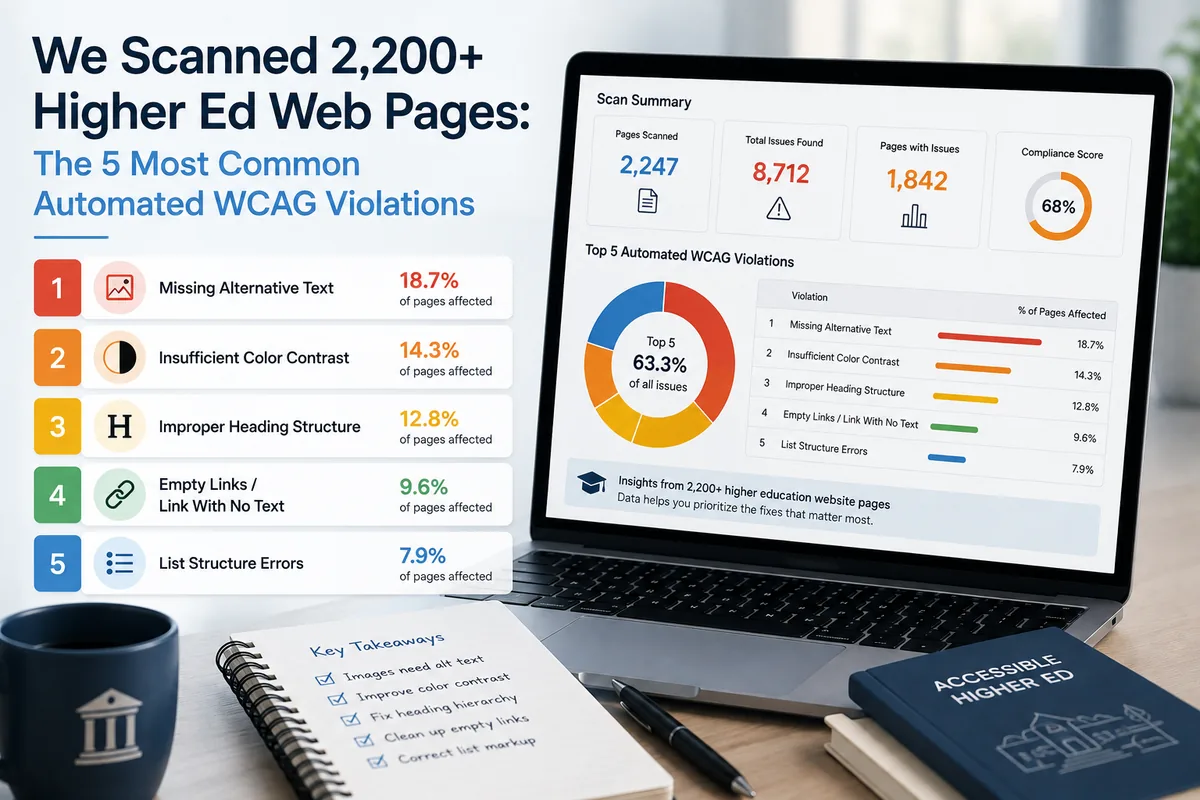
What automated tools do well is catch a broad and consistent set of detectable issues: missing form labels, insufficient color contrast ratios, images without alt attributes, missing document language declarations, broken skip navigation links, and similar patterns that have clear, machine-verifiable signatures.
Those detectable issues represent a meaningful portion of the barriers real users encounter. Catching them automatically, consistently, and early is valuable precisely because it frees your accessibility specialists to focus their time on the judgment-dependent issues that machines cannot evaluate.
GuardGrid is designed with this division of labor in mind. Automated scanning handles the repeatable, high-volume detection work. Your team handles interpretation and remediation with the full picture in front of them.
Governance Across the Full Site, Not Just a Sample
Another limitation of manual audits is scope. Auditing every page of a large site is rarely practical, so auditors typically sample. They select representative templates, high-traffic pages, and critical user flows, and they extrapolate.
Automated scanning does not need to sample. GuardGrid can monitor your full page inventory, which means issues on lower-traffic pages, campaign landing pages, PDF documents, and dynamically generated content are visible alongside your homepage and primary navigation flows.
For organizations with governance obligations across a portfolio of sites, this matters. A sampling-based audit of one site does not tell you what is happening on the other properties you are responsible for.

Fitting Scanning into a Governance Program
Continuous scanning is most effective when it is integrated into the broader governance workflow rather than treated as a standalone report.
In practice, that means connecting scan results to the teams who can act on them. GuardGrid surfaces findings with enough context, page location, element reference, and criterion mapping, that a developer or content author can understand what needs to change without having to interpret raw output.
It also means tracking conformance over time. A single scan result tells you the current state. A trend line tells you whether your site is improving, holding steady, or regressing. That trend data is what makes it possible to demonstrate progress to leadership, respond credibly to external inquiries, and plan remediation work with realistic scope.
Organizations preparing for a formal audit are better positioned when they have continuous data behind them. They can address the detectable issues in advance, which focuses the auditor’s time on the harder questions rather than the low-hanging corrections.
Starting with Continuous Visibility
The shift from periodic audits to continuous governance does not require replacing your existing audit process immediately. It requires adding visibility between audits.
GuardGrid is built to provide that visibility across accessibility, SEO, answer engine optimization, and security monitoring in a single platform. Accessibility scanning is part of a broader governance posture, not an isolated tool.
If your organization is carrying accessibility risk between audits, automated scanning is the most direct way to reduce that exposure without waiting for the next scheduled review.