WCAG 2.2: The Nine New Success Criteria
WCAG 2.2 added nine success criteria covering cognitive load, mobile interaction, and authentication. What changed, why it changed, and how to test each one.

WCAG 2.2 became a W3C Recommendation in October 2023, building on 2.1 with nine additional success criteria. Crucially, 2.2 is backward compatible: meeting 2.2 means you also meet 2.1 and 2.0. If you are working toward a Title II or procurement target framed around 2.1 AA, moving to 2.2 is the safer bet - it future-proofs your work.
Here is what the new criteria are actually trying to protect, in plain terms.
Before the details, one framing point. The nine additions are not arbitrary - they cluster around three groups of users who were under-served by 2.1: people using a keyboard or switch device instead of a mouse, people on touch screens and mobile, and people with cognitive or memory-related disabilities. If you remember those three audiences, the individual criteria make intuitive sense rather than reading like a compliance checklist.
Focus and interaction
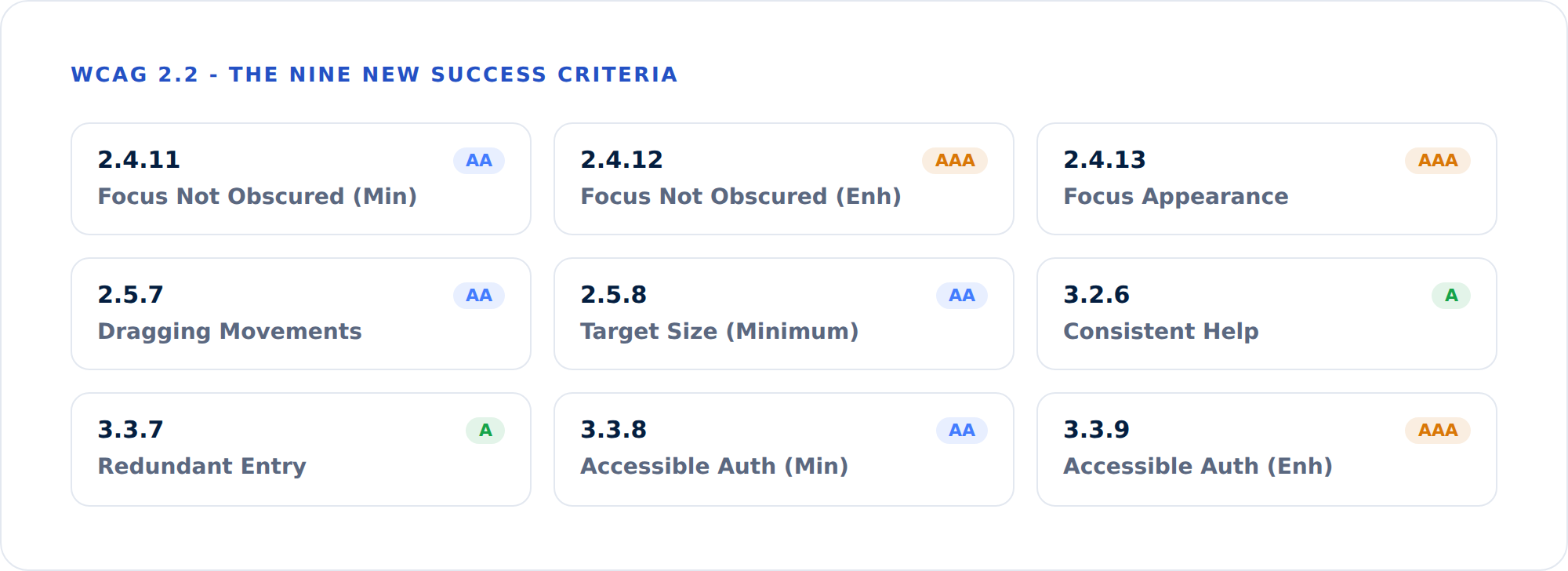
Focus Not Obscured (2.4.11, AA) requires that when an element receives keyboard focus, it is not completely hidden by other content - a sticky header or a cookie banner, for example. Keyboard users need to see where they are.
Focus Appearance (2.4.13, AAA) goes further, defining how visible a focus indicator must be in terms of size and contrast.
Dragging Movements (2.5.7, AA) says any action that relies on dragging must offer a single-pointer alternative that does not require dragging. Think reordering a list or a slider - there should be buttons or taps that achieve the same thing.
Target Size (Minimum) (2.5.8, AA) sets a minimum interactive target of 24 by 24 CSS pixels (with sensible exceptions for inline links and spacing). This is a direct response to tiny, hard-to-tap controls on mobile.
Reducing cognitive load
Consistent Help (3.2.6, A) asks that help mechanisms - a contact link, a chat widget, a phone number - appear in the same relative order across pages, so people do not have to relearn where to find support.
Redundant Entry (3.3.7, A) says you should not force users to re-enter information they have already provided in the same process, unless it is essential. Auto-populate or let them select previously entered data.
Accessible Authentication (Minimum) (3.3.8, AA) is one of the most consequential. It prohibits cognitive function tests - like remembering a password or solving a puzzle - as the only way to log in, unless an alternative exists. Allowing password managers to paste credentials satisfies it. Many login flows quietly fail this today.
Accessible Authentication (Enhanced) (3.3.9, AAA) removes the object-recognition and personal-content exceptions allowed at AA.
What got removed
One criterion from earlier versions, 4.1.1 Parsing, was deprecated in 2.2. Modern browsers handle the underlying parsing issues, so it no longer maps to real user harm. If your old reports still flag it, they are out of date.
A practical adoption checklist
If you are moving an existing program from 2.1 to 2.2, you do not have to start over. Work through the nine additions in roughly this order, since it front-loads the changes that affect the most users:
- Audit your authentication flow first. Accessible Authentication (3.3.8) is the highest-impact addition. Confirm password managers can paste, and that you are not forcing CAPTCHA-style cognitive puzzles as the only path in.
- Measure your tap targets. Run an automated check for controls under 24x24 CSS pixels, concentrating on mobile navigation, icon buttons, and footer links.
- Replace drag-only interactions. Any slider, reorderable list, or drag-to-upload needs a click or tap equivalent.
- Check focus visibility against sticky elements. Tab through each template with a visible keyboard focus indicator and watch for headers, chat widgets, or banners that cover the focused control.
- Standardize help placement. Make sure your contact link, help link, or support widget sits in the same relative position across templates.
- Reduce redundant entry. In multi-step forms, carry forward data the user already provided.
Most of this is template-level work. Fixing a focus or target-size issue in a shared component corrects it everywhere that component appears, which is why a site-wide view matters more than spot-checking individual pages.
How to test for the new criteria
Some of these are straightforwardly automatable. Target size, for instance, can be measured programmatically. Others - consistent help, redundant entry, accessible authentication - require an understanding of flow and context that pure automation cannot fully judge. The honest answer is that good accessibility programs combine automated scanning for the criteria machines test well with human review for the criteria that need judgment.
GuardGrid runs the full WCAG 2.2 automated rule set on every page and flags the criteria that warrant manual confirmation, so your team spends its limited review time where it actually counts - not re-checking things a scanner already proved.
Test your site against WCAG 2.2 today. Run a free scan for an instant grade, or see the full feature list to understand what GuardGrid checks on every page.