Full-Site Scanning vs the One-Page Check
A homepage scan tells you almost nothing about the other few thousand pages. Why sampling hides real risk, and what full-site coverage actually changes.

Run almost any free accessibility checker and you get a report for one page. It feels productive - a list of issues, a score, maybe a celebratory green checkmark. But a single-page check answers a question almost nobody is actually asking.
The question that matters is not “is this page accessible?” It is “is my site accessible?” And those are wildly different questions.
Violations live in templates and long-tail pages
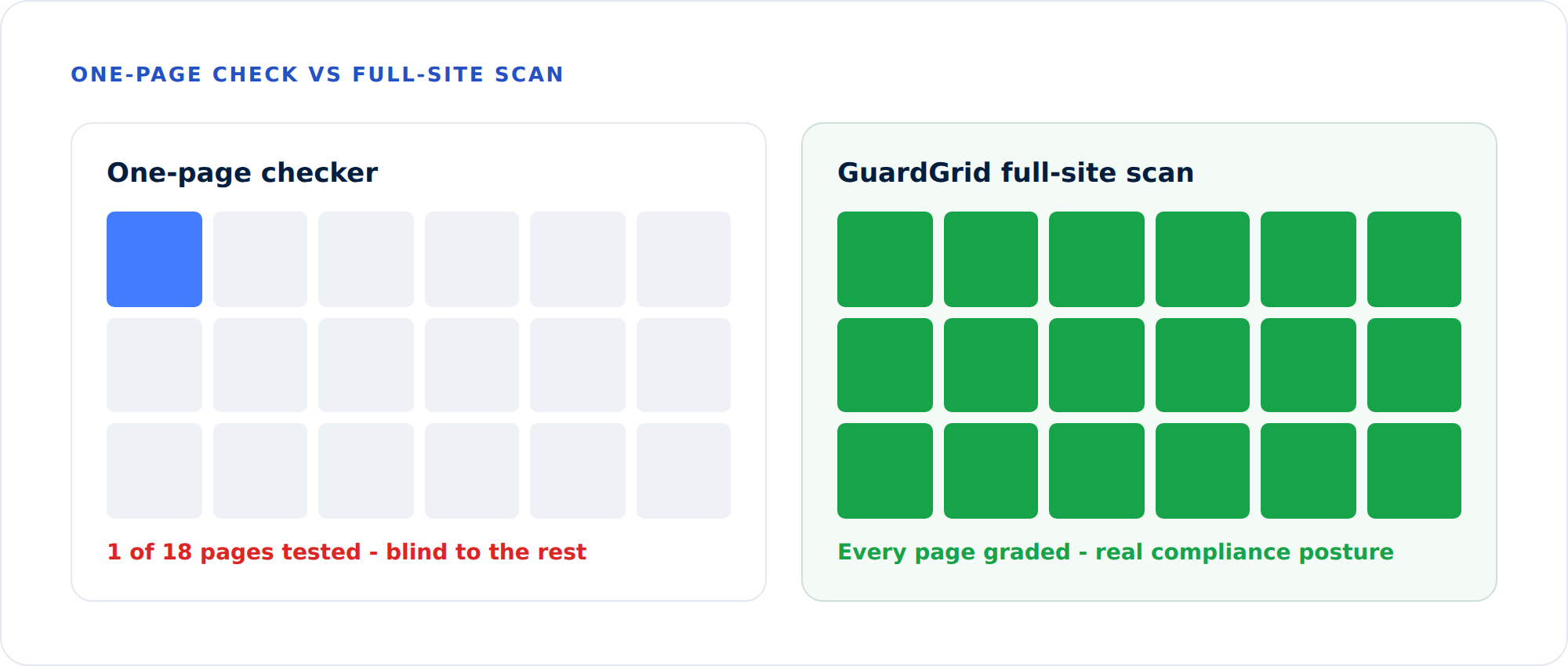
On a real institutional website, the homepage is usually the most-polished page on the property. It gets the most attention, the most testing, and the most design love. It is the least representative page you could possibly sample.
The violations that generate complaints tend to live elsewhere:
- Templates that repeat a single mistake across thousands of generated pages - an unlabeled search field, a low-contrast button, a heading structure that skips levels.
- PDFs and documents uploaded by departments without accessibility review.
- Deep program and course pages that no one has looked at in years.
- Forms buried three clicks into an enrollment flow.
A one-page check sees none of this. You can earn a perfect score on your homepage while the other 1,200 pages quietly fail.
A quick worked example
Picture a college site with 1,500 pages. The homepage and top five landing pages are immaculate - they get tested constantly. A one-page checker reports a clean bill of health. Meanwhile:
- The course-catalog template carries one low-contrast heading, repeated on 600 generated pages.
- The staff-directory template has an unlabeled search field, repeated on 120 pages.
- The document library holds 300 PDFs, roughly 180 of them untagged and unreadable by a screen reader.
That is well over a thousand individual failures the single-page tool never saw - and any one of them can anchor a complaint. The homepage score said 100. The real site-wide picture is closer to a failing grade. Coverage is the difference between those two numbers.
Coverage is the real number
We think the most honest top-line metric for a site is coverage: of all the pages you actually have, how many have been tested, and how recently? A grade computed across 100% of your pages means something. A grade computed across one page is theater.
This is why GuardGrid starts by crawling the property to build a real page inventory, then tests every page it finds. The compliance grade you see is an average across the whole site, weighted by severity - not a flattering sample.
Continuous beats point-in-time
There is a second problem with one-off checks: websites change. A new blog post, a new program page, a vendor widget update - any of these can introduce a violation the day after your audit was delivered. A PDF that was fine last month gets replaced with an inaccessible scan.
Point-in-time audits are a photograph. Compliance is a movie. The institutions that stay compliant are the ones monitoring continuously, catching regressions within days rather than discovering them in a demand letter.
The hidden cost of sampling
There is also a workflow cost to single-page tools that teams underestimate. When you test one page at a time, every fix is a guess about whether the same problem exists elsewhere, and every re-test is manual. A site-wide scan turns that into a managed process: you see that one template drives 600 failures, you fix the template once, and the next scan confirms all 600 cleared. The unit of work becomes the template, not the page - which is the only way the math works on a site with thousands of URLs and a deadline.
Full-site coverage also changes the conversation with leadership. “Our homepage passed” is not an answer a general counsel can rely on. “We test 100% of our pages weekly, our site-wide grade moved from C to A over the last quarter, and here is the exported evidence” is a defensible program. The second statement is only possible if you are measuring the whole site over time.
What good scanning looks like
A scanner worth relying on should:
- Discover the whole site, not just the URL you paste in.
- Test against the current standard - WCAG 2.2, not a years-old rule set still flagging deprecated criteria.
- Report by severity, so you can fix what hurts users most, first.
- Point to the exact element that fails, not just the criterion.
- Track history, so improvement is provable.
That is the bar GuardGrid was built to clear. Paste in a domain and you will get a grade for the whole property - and a very different, much more useful picture than a one-page checker ever gave you.
Stop guessing from one page. Run a free full-site scan and get a grade across every page, or compare plans to see how many pages each tier covers.