ADA Title II Web Deadlines: 2027 and 2028
The DOJ extended the Title II web compliance dates to April 26, 2027 and April 26, 2028. Who falls where, what WCAG 2.1 AA requires, and what to do now.
In April 2024, the U.S. Department of Justice finalized a rule under Title II of the Americans with Disabilities Act that, for the first time, sets a specific technical standard and hard deadlines for the accessibility of web content and mobile apps operated by state and local governments. Public community colleges, technical schools, universities, and the agencies that serve them all fall squarely within scope.
On April 20, 2026, four days before the original deadline, the DOJ published an interim final rule extending the compliance dates by one year. That bought covered entities time. It did not change the obligation.
The short answer
Public entities serving populations of 50,000 or more must comply by April 26, 2027. Smaller public entities and special district governments have until April 26, 2028. The standard is WCAG 2.1 Level AA. Those dates and that standard are stated in the DOJ’s own fact sheet on the web and mobile app rule. Nothing about the extension suspended the underlying nondiscrimination obligation, and private actions continue in the interim.
If your institution has been treating accessibility as a nice to have, that posture is still a liability. The rule turns WCAG conformance into a legal obligation with a date attached, now a slightly later date.
What the rule actually requires
The standard is WCAG 2.1 Level AA. Every web page and mobile app a covered entity provides, or makes available through a contractor, has to conform. This is not limited to the homepage or to pages a person is most likely to land on. It covers the whole digital footprint: program pages, PDFs, forms, embedded video, third-party tools, and content posted by departments across the institution.
A handful of narrow exceptions exist, such as archived content that is not currently used and certain pre-existing documents, but they are far narrower than most teams assume. Treating them as a loophole is risky.
It is worth being precise about what conformance means, because it is stricter than passing an automated scan. WCAG 2.1 AA covers four principles, that content must be Perceivable, Operable, Understandable, and Robust, across 50 individual success criteria at the A and AA levels. You can read each one, with sufficient techniques and documented failures, in the W3C’s How to Meet WCAG quick reference.
The automated testing ceiling
Here is the part most procurement conversations skip. No scanner, ours included, can evaluate every success criterion. Industry consensus puts automated coverage at roughly a third to 40 percent of WCAG issues. The W3C is direct about it on its evaluating accessibility guidance: “no tool alone can determine if a site meets accessibility standards. Knowledgeable human evaluation is required to determine if a site is accessible.”
That is not an argument against automation. It is an argument for knowing what each half does. A machine can tell you that an image has no alt attribute across 4,000 pages in one pass. It cannot tell you whether alt="image1.jpg" is meaningful, whether your reading order makes sense in an unusual layout, or whether a keyboard-only user can actually complete your application form. A defensible program pairs continuous automated scanning with periodic human review of the criteria machines cannot judge.
The criteria that trip up institutions most
A small set of issues account for the overwhelming majority of violations. WebAIM’s annual WebAIM Million study of the top one million home pages, most recently run in February 2026, found detected WCAG failures on 95.9 percent of home pages, averaging 56.1 errors per page. Six failure types accounted for 96 percent of all errors found:
| Failure type | Share of home pages |
|---|---|
| Low contrast text | 83.9% |
| Missing image alternative text | 53.1% |
| Missing form input labels | 51.0% |
| Empty links | 46.3% |
| Empty buttons | 30.6% |
| Missing document language | 13.5% |
Two things follow from that list. First, these are overwhelmingly template-level problems. A branded button color that fails contrast fails on every page that uses the button. Second, every one of them is machine-detectable, which means the highest-volume portion of your remediation work is exactly the portion automation is good at finding.
On higher-ed and government sites specifically, add one more category that the WebAIM home page study does not capture: inaccessible PDFs. Decades of catalogs, board minutes, forms, and policies live as untagged documents, and they are frequently what a complaint cites.
Who has to comply, and by when
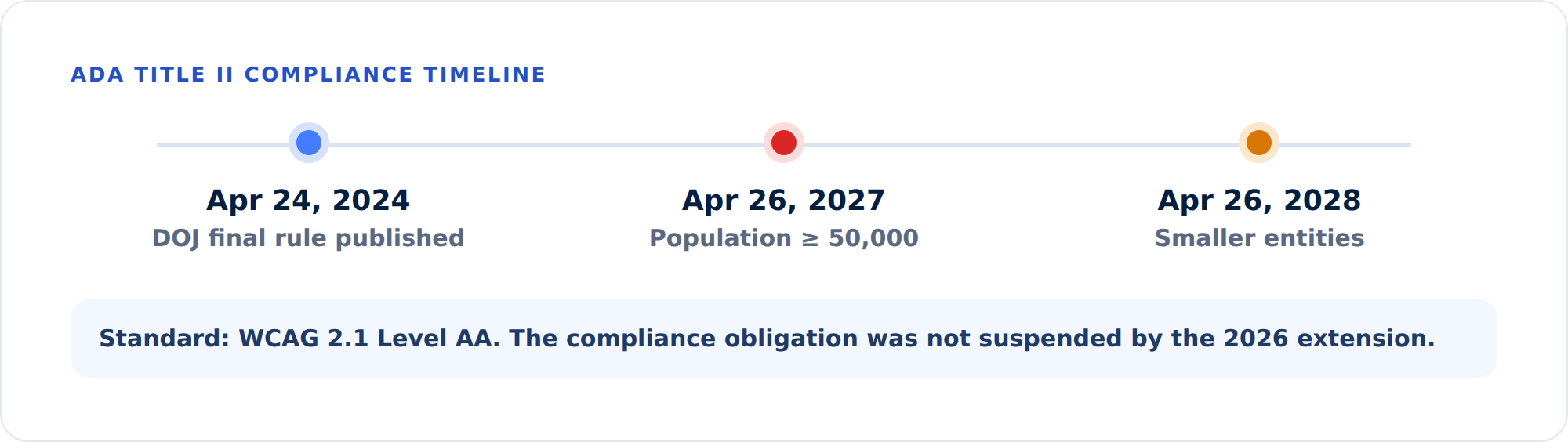
The deadline depends on population size. Under the April 2026 interim final rule:
- Entities serving 50,000 people or more now have until April 26, 2027, extended from April 24, 2026.
- Entities serving fewer than 50,000 people, plus special district governments, have until April 26, 2028.
Population is calculated at the jurisdiction level, not by enrollment, which is why nearly all public universities land in the larger-population bucket with the April 26, 2027 date. Some standalone community colleges in smaller jurisdictions fall under the later deadline, but the math is not always obvious. When in doubt, plan for the earlier date.
Private colleges and universities are generally covered under Title III rather than Title II. There is no fixed date there, which in practice means the exposure is continuous rather than scheduled.
Why “we’ll fix it if someone complains” fails
Two things have changed the risk calculus.
First, there is now a clear federal standard, so a plaintiff no longer has to argue about what accessible means. They can point to specific WCAG success criteria and to the DOJ’s own rule.
Second, accessibility-related legal actions against educational institutions have climbed year over year, and many begin with a demand letter rather than a lawsuit. If one lands on your desk, the useful question is not whether your site was perfect that morning. It is whether you can show what you knew, when you knew it, what you prioritized, and what you fixed. We wrote a separate walkthrough of that scenario in what to do when an ADA website demand letter arrives.
What protects an institution in that moment is evidence of an active, good-faith program: documented scanning, a record of issues found and fixed, and a trend showing measurable improvement. A site that has never been tested has none of that.
A practical path forward
- Establish a baseline. Run a full-site accessibility scan so you know your current grade and where the violations concentrate. A homepage sample is not a baseline.
- Triage by severity. Fix critical and serious issues first: missing alternative text, keyboard traps, insufficient contrast, unlabeled form fields.
- Address templates, not just pages. A single bad template can generate the same violation across thousands of pages. Fixing it once resolves all of them, which is why the first week of a well-sequenced program usually clears the most ground.
- Put documents in scope. Inventory the PDF library early. It is almost always larger and worse than the team expects, and it takes longer to remediate than HTML.
- Monitor continuously. New content reintroduces violations. Point-in-time audits go stale the day after they are delivered.
- Keep the receipts. Retain scan history and exportable evidence so you can demonstrate progress on demand.
For a fuller version of that sequence, including how to decide who does the fixing, see our practical guide to making a website ADA compliant.
Where GuardGrid fits
GuardGrid was built for exactly this. It crawls every page on a property, tests each one against WCAG 2.1 and 2.2, assigns a letter grade weighted by severity, and names the exact element that fails along with the criterion it breaks. Page Explorer Visual Review shows each violation marked in place on a screenshot of the page, so a department content editor can act without a developer translating a DOM selector for them.
To be clear about the division of labor: the platform finds, documents, and tracks. It does not rewrite your code or push changes into your CMS. When you need to show your work, to leadership, to an auditor, or to opposing counsel, the Compliance Evidence PDF and VPAT 2.5 exports are generated from your real scan data. If your team would rather hand off the fixing entirely, our ADA remediation service puts Revion Solutions engineers in your codebase to do the work and document it.
If you are still deciding what class of tool you need, we published an honest breakdown of the options in ADA compliance tools compared.
The deadline is not a finish line. It is the start of an ongoing obligation, and the institutions that treat it that way are the ones that stay out of trouble.
See where your site stands today. Run a free GuardGrid scan for a WCAG 2.2 grade across your whole site, or explore the platform to see how continuous monitoring and audit-ready evidence work together.
Frequently asked questions
What are the ADA Title II web accessibility deadlines?
Public entities serving populations of 50,000 or more must comply by April 26, 2027. Smaller public entities and special district governments have until April 26, 2028. Both dates come from the Department of Justice interim final rule published April 20, 2026, which extended the original 2026 and 2027 dates by one year. The technical standard is unchanged: WCAG 2.1 Level AA.
Does the extension mean we can wait a year?
No. The extension moved the enforcement date, not the underlying obligation. Title II already prohibits discrimination on the basis of disability, private plaintiffs and advocacy organizations continue to bring actions during the interim, and the Office for Civil Rights continues to process complaints. A year also disappears quickly when a site has thousands of pages and an untagged PDF library.
Which deadline applies to a community college?
Population is measured at the jurisdiction level, not by enrollment, which is why nearly all public universities and colleges in metropolitan areas land in the April 26, 2027 bucket. Some standalone community colleges serving smaller jurisdictions fall under April 26, 2028, but the calculation is not always obvious. If your legal counsel has not made a written determination, plan for the earlier date.
Is the standard WCAG 2.1 AA or WCAG 2.2 AA?
The rule references WCAG 2.1 Level AA. WCAG 2.2 is backward compatible, so conforming to 2.2 AA also satisfies 2.1 AA. There is no downside to testing against 2.2, and it positions you ahead of where the standard is heading.
We use an accessibility overlay widget. Does that cover us?
No. An overlay changes what a visitor browser renders. It does not change the HTML your server sends, which is what an investigator, a procurement reviewer, or a plaintiff's expert tests. The rule is about your content meeting WCAG, not about a widget being present. Overlays have also drawn litigation and regulatory scrutiny in their own right.