What's New in GuardGrid: November 2026
AEO is now generally available in GuardGrid. Explore AI answers, visibility trends, topic maps, competitor tracking and new Entity Coverage.

AEO is now generally available: see how AI models mention your organization, understand the topics on your website and follow the evidence behind every result.
Your next prospective student may ask an AI assistant about affordable programs, transfer options or returning to school. Does your institution appear in the answer? What does the model actually say? And does your website clearly explain the subjects that matter to that student?
GuardGrid’s Answer Engine Optimization workspace is now generally available. It brings those questions into a practical workflow: save the questions your audience asks, review recorded answers from ChatGPT, Claude and Gemini, follow your visibility over time, and explore the content behind your website’s topics.
Our October update connected Google search and traffic data with site quality. This month adds another view of discoverability: what AI models say, alongside what your own pages contain.
Here are the biggest changes since October 1, plus a preview of the Content Gaps improvements still in progress.
All product images below use fictional data. Example Community College, its questions, results, pages and competitors are illustrative.
Ask the questions your audience actually asks
A useful AI visibility check starts with a useful question. Instead of asking only about your institution by name, think about what someone would ask before they know you exist.
For our fictional Example Community College, that might include affordable colleges nearby, university transfer options, programs for adults returning to school, or career training in the area.
In AI Visibility, you can review your organization’s identity and save one to five questions. GuardGrid sends the same saved questions to each provider. A complete five-question measurement expects fifteen answers across the three providers.
You can run an eligible measurement manually or turn on optional weekly tracking. The workspace keeps drafts separate from your saved questions and explains when the next run is available. Saving a question does not start a measurement by itself.
See each model’s answer, not just a percentage
The provider cards show how often each model named your organization in its successfully scored answers. Open a question to read the full recorded answer and inspect the evidence for yourself.
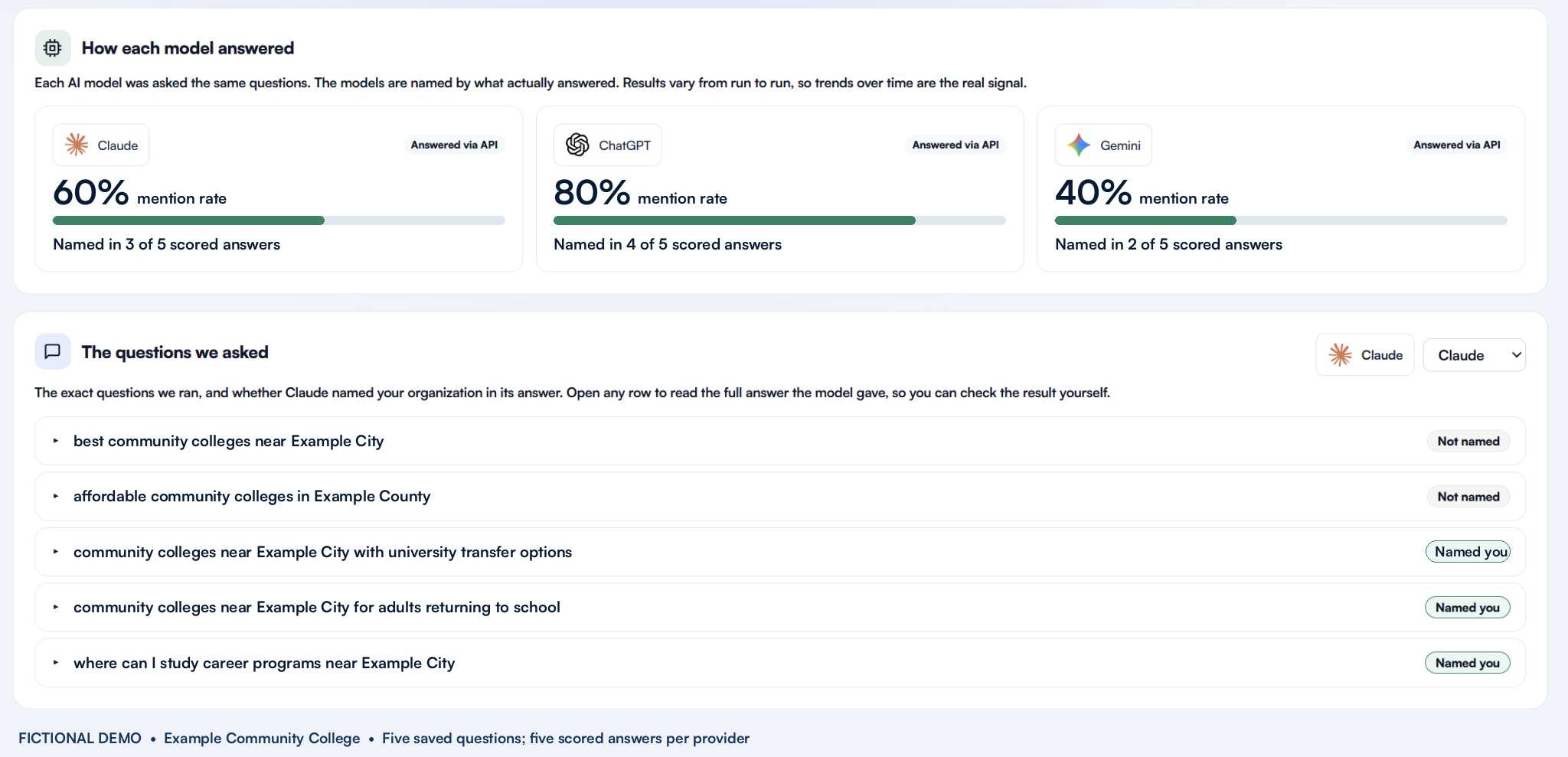
In this example, Claude’s 60% means three mentions out of five successfully scored answers. It does not mean 60% of all AI users will see the institution. Unavailable or unsuccessful results do not become automatic non-mentions; coverage remains part of the story.
That distinction makes the workspace useful for investigation. You can see which questions include you, which do not, and how the answers differ between providers. A single aggregate score would hide those differences.
How the measurement works: GuardGrid uses provider APIs without web search for these answers. Results can differ from the consumer chat applications and vary between runs. Treat them as recorded observations of your saved questions, rather than a universal AI ranking.
Follow visibility over time
One answer is a snapshot. A history of answers gives your team something to review over time.
The AEO Overview and AI Visibility views now share provider-specific history. ChatGPT, Claude and Gemini each have their own series, with dated measurements and scored-answer coverage. You can inspect the points and replay the chart animation.
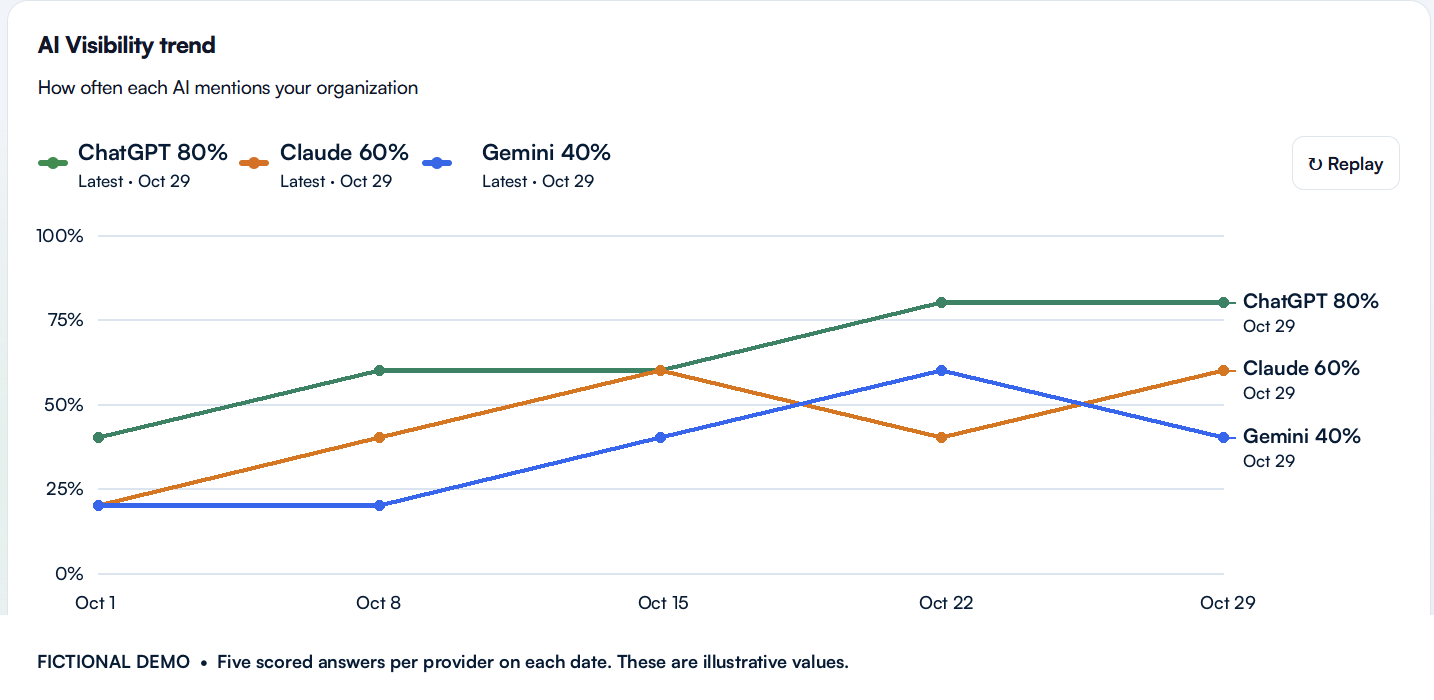
Keep the questions stable when you want a useful comparison. A change in questions or measurement method needs context, and missing evidence should stay missing. GuardGrid preserves that distinction instead of treating an unavailable result as zero.
Use the trend as a reason to open the underlying answers. If visibility changes, first check what was asked, which answers were scored and what the models actually returned. A rising line alone does not prove that a particular website edit caused the change.
Your topic map: see how your website’s content connects
A large website can be difficult to understand one page at a time. Your topic map offers a broader view of the words and relationships found in the content GuardGrid could read.
Think of it as a way to explore the subjects your site discusses and how those subjects connect in its text. For a college, groups might form around transfer programs, admissions, financial aid, student support, career pathways and campus life.
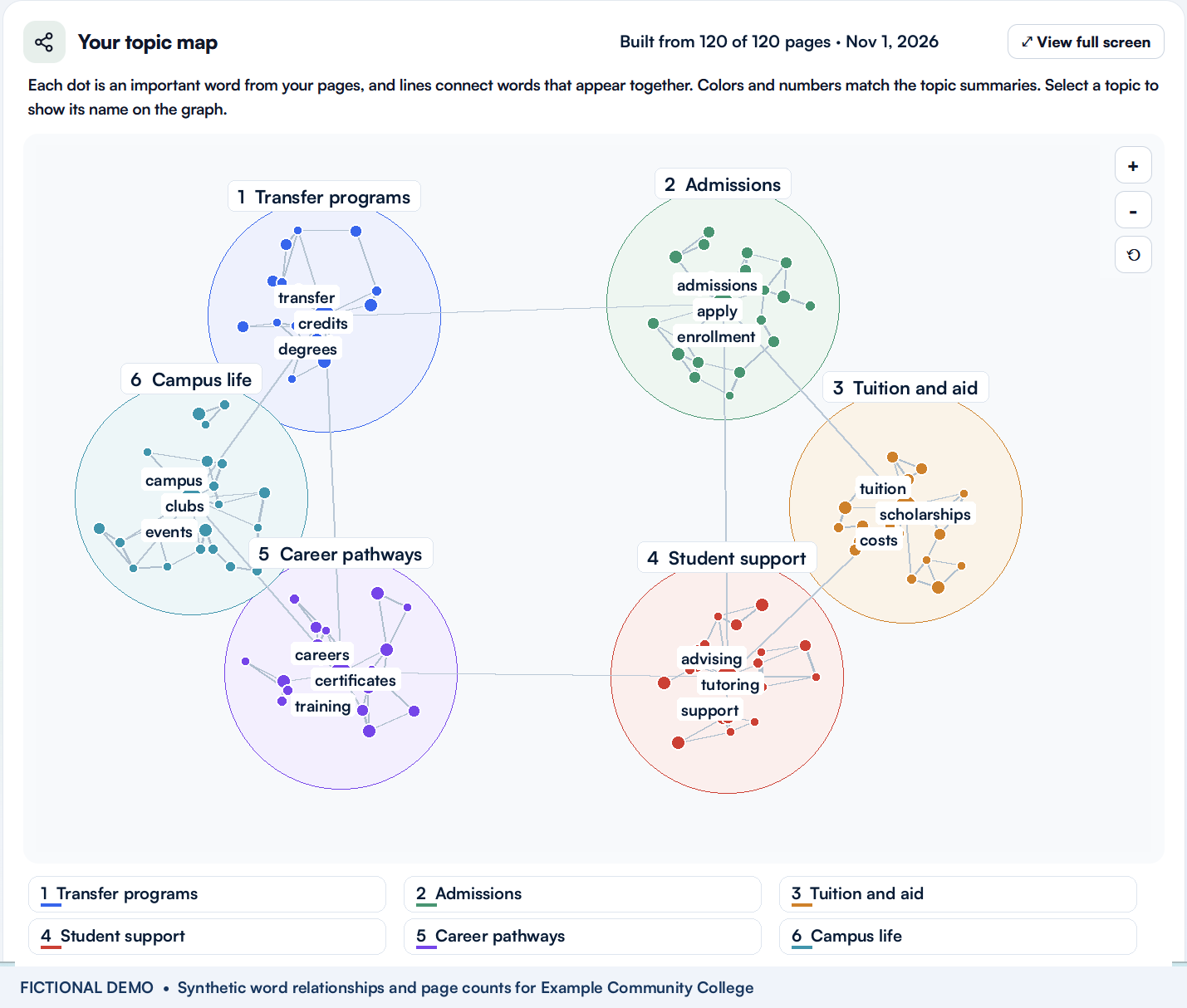
What the dots, lines and colors mean
Each dot is a word extracted from scanned page content. It is not a page, a student or an AI answer. Larger dots connect to more distinct words in the graph. Size describes connectivity within this content, not search volume or the importance of a program to your institution.
A line connects words that occur near each other in the content. For example, transfer, credits and degrees may connect because your pages discuss them together. These lines are word relationships, not hyperlinks between pages. A weak connection is a prompt to investigate the content, not proof that an internal link is missing.
Colors group related words into topics. The numbered topic summaries help you move between the graph and the subjects it contains. Generated topic names summarize detected site terms; they are labels to help you navigate, not an independent statement about what your institution offers.
Connecting terms help reveal relationships between topics. A word such as credits may connect transfer information with degree requirements. Those bridges can help an editor see whether related ideas are discussed together or scattered across separate areas of the site.
How to use the map in a content review
Start with the coverage count. “Built from 120 of 120 pages” describes the pages included in this fictional example, not a guarantee that every page on a public website was discovered. On your own property, review how much scanned content had usable text before drawing conclusions from an apparent gap.
Next, select a topic that matters to your audience. Highlight its words, expand its details and inspect the detected terms and supporting pages. Zoom or use the larger view to explore the relationships without trying to read every dot at once.
For example, suppose prospective transfer students are a priority. Review the transfer topic and its supporting pages. Do those pages clearly explain credit evaluation, the application process and where students can get help? If the topic is thin, open the actual pages and check whether the information is missing, uses different wording, or simply was not included in the crawl.
Then compare related subjects. Tuition and financial aid may deserve a review together because students need both to understand affordability. The map can point you toward that review; your editors still need to decide whether the pages are accurate, complete and easy to use.
Finally, use AI Visibility as a separate source of evidence. A topic map describes your site’s content. AI Visibility records model answers. Looking at both can help you choose questions to investigate, but the map does not show what a model has indexed or explain why it mentioned or omitted you.
The goal is a better editorial conversation: which subjects do we cover, how do they connect, and which pages should we review next?
Keep your chosen competitors in view
You can now manage tracked competitors directly from AEO, using the list shared with the Competitors workspace.
For example, a team could choose the fictional Northstar Community College at northstar.example or Lakeside Technical College at lakeside.example. These are examples, not actual institutions or customer data.

That separation matters. Tracked competitors are organizations you choose to monitor. Other organizations mentioned comes from the recorded answers and lets you inspect the supporting evidence. Selecting a competitor does not verify an organization, insert its name into an answer or change historical measurements.
Together, these views help you keep your comparison set organized while checking who actually appeared in the answers you measured.
New: Entity Coverage connects AI subjects with your pages
Entity Coverage adds a more specific question: when a recorded AI answer names a subject, can GuardGrid find that subject in your crawled site content?
The new tab lists subjects such as programs, services, costs and places found in recorded AI Visibility answers. It checks those subjects against your crawled pages and links to pages where they appear. It also shows the questions, models, answers and pages used in the comparison.
For example, if an answer mentions transfer credits, the next step is to inspect the pages where that subject appears. If the words are not found, review whether the site uses different wording or whether relevant pages were outside the crawl.
Entity Coverage is computed with each new AI Visibility measurement. Older measurements may not contain it yet. It compares two observations, what the answers named and what the crawled pages contain; it does not establish that a missing phrase caused an AI model to omit your institution.
In development: more useful Content Gaps
We are continuing to build and refine Content Gaps so the path from reviewing content to making an improvement is clearer. This section is a preview of work still being refined.
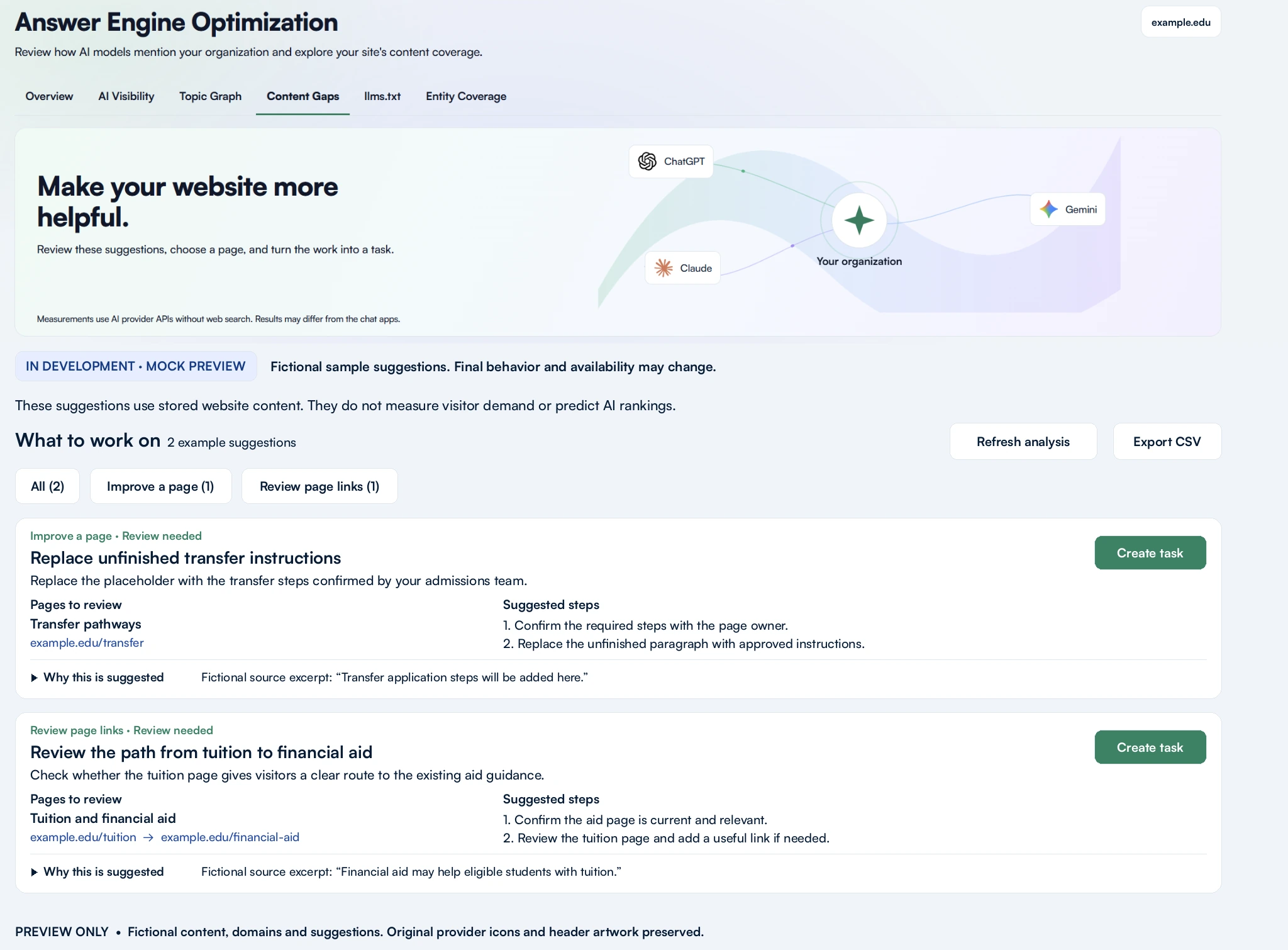
The direction is specific, reviewable work: identify the page, explain the observed issue, show supporting passages and suggest steps your team can check before editing. The preview illustrates replacing unfinished transfer instructions and reviewing the path from tuition information to an existing financial aid page.
We are refining how reviews check for answers elsewhere in stored content, distinguish incomplete analysis from confirmed findings, and carry supported recommendations into editable Tasks and CSV exports. An empty result should never imply that every page is complete or every possible question was checked.
These suggestions are intended to support your team’s judgment. They do not measure visitor demand, automatically change your website or guarantee better AI visibility.
More improvements across GuardGrid
Alongside AEO, October’s updates made everyday review work more practical:
- Larger broken-link rechecks. Select all matching links across the filtered results and let the recheck continue when you leave the page.
- More useful heading-order findings. Findings explain the heading change suggested by the surrounding structure, with clearer context for embedded content and panel coverage.
- Clearer page status. Pages that no longer exist, cannot be measured or are no longer tracked are handled more consistently across inventories and reports.
- Support replies by email. You can reply to a support ticket email and keep the conversation attached to the ticket.
There is also an important scoring change to know about: since October 6, accessibility deductions no longer stop at 30 points per page. Some scores and grades can fall as pages are rescanned because the calculation now counts more findings, even when the website itself has not changed.
Start with five questions
You do not need to review everything at once. Start with the audience questions your team most wants to understand.
- Sign in to GuardGrid and select your website.
- Open Answer Engine Optimization on a property with AEO access, then review your identity and save one to five questions in AI Visibility.
- Run an eligible measurement and read the provider answers behind the results.
- Explore the topic map and Entity Coverage to identify pages worth reviewing.
- Turn on weekly tracking if you want a continuing record of those questions.
See what AI says. Understand what your site contains. Give your team a clearer place to start.
Open GuardGrid or book a demo for a walkthrough.